Binge eating app for iPhone and Android

Quit binge eating at your own pace

Quitzilla counts your binge-free days and the money you keep, and after a slip it offers a fresh start, not a lecture.

Download on the App StoreGet it on Google Play

4.8 on the App Store 4.6 on Google Play

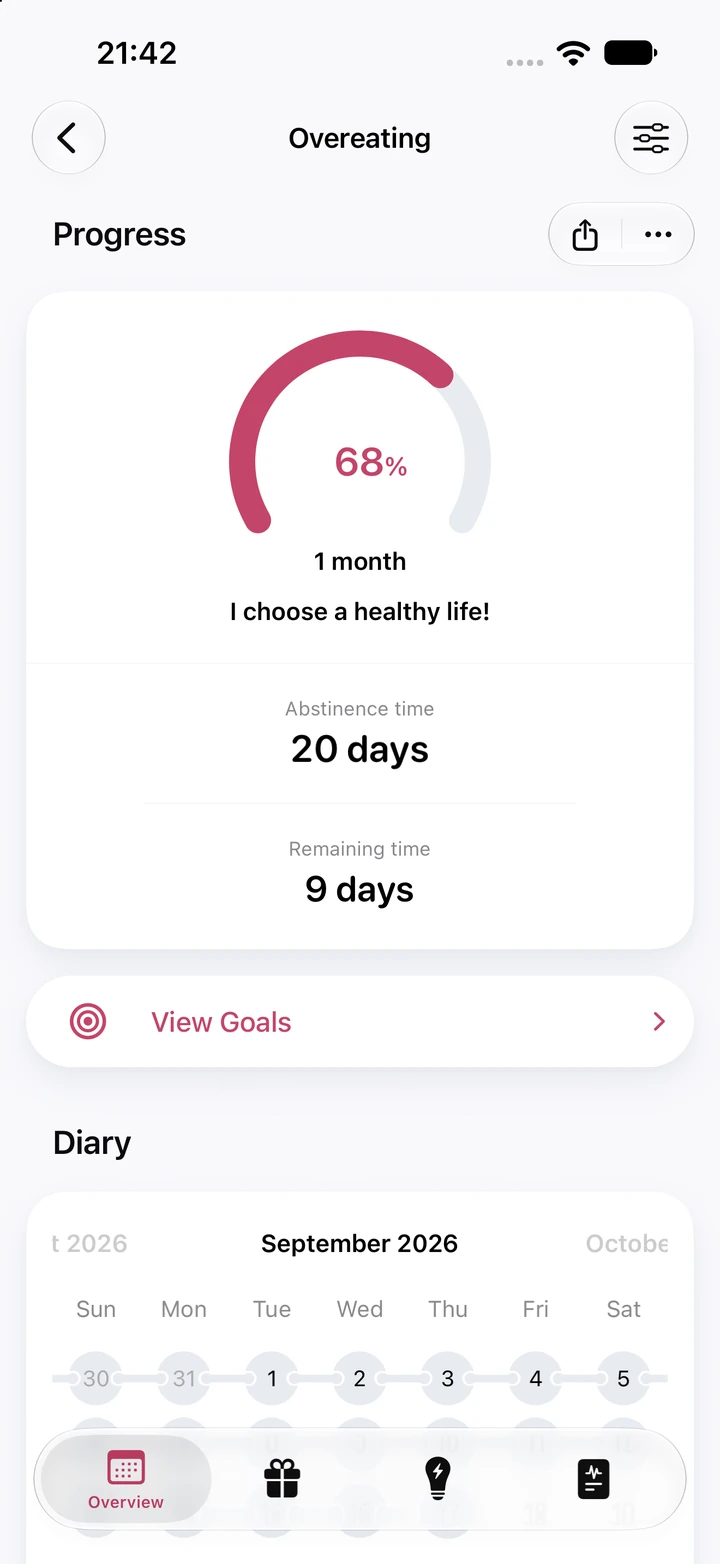
Overeating progress screen: 20 days of abstinence time, 68% of a 1-month goal and 9 days remaining

Try the calculator

See what binges used to cost you

Enter the date of your last binge and a rough daily average of what bingeing cost you in money and time. In the app, you can also set it per week or month.

Overeating savings screen: a $416 current balance, $165.77 saved since abstinence began and a $350 Sneakers reward at 100%, ready to purchase

Overeating

Inside the app

Something steady for the hard evenings

There are no food rules here and no scolding. A slip becomes a diary entry, your history stays, and your reasons are there whenever you need them.

Reasons to Quit

  1. I choose to eat mindfully and respect my body!
  2. I finish a meal and move on with my day
  3. My late nights don't end in the kitchen
  4. I'm building a healthier relationship with food

Only examples. Any words that feel right to you will do.

Reasons to come back to on hard evenings

Pick the Overeating template and Quitzilla starts you off with a few suggested reasons. Rewrite any of them until they sound like you, and read them back when the urge to binge builds.

New diary entry: an empty Thoughts & Notes field, the Relapse switch turned on and a money spent field at $0

Example diary noteRough evening and I ate on autopilot. Next time, I'll step outside and call a friend.

A slip is a note, not a verdict

Log a binge in the diary as a relapse: the timer starts over, while your earlier stretches and records stay. A few words about how the day went can help you notice what set it off.

Overeating charts: nine abstinence periods with a 6-day average, the current 20-day stretch as the tallest bar, and a spending chart

Earlier stretches stay in the picture

The Abstinence Periods chart keeps each binge-free stretch next to the one you're in now, so a relapse doesn't erase what came before. Charts are part of Premium.

Reviews

Real people. Real progress.

App Store4.8★★★★★1,507 ratings
Google Play4.6★★★★★96,393 ratings

Much to be grateful for

Even if you relapse, it doesn't blame you. I'd recommend this app to anyone.

App Store review, translated from German

Store ratings as of October 1, 2026.

Frequently asked questions

Got questions? We've got answers.

Ask us anything
How can Quitzilla help with binge eating?

Quitzilla is a tracker for a habit you want to stop. There is no "Binge eating" template in the app: choose Overeating, the closest one, or add your own habit and name it "Binge eating". You set when your last binge was, what bingeing cost you and which reasons matter to you. From then on, the counter runs to the second, the money and evenings you get back add up, and a ring shows how close your next goal is.

Is Quitzilla a treatment for binge eating?

No. Quitzilla counts time, keeps your reasons and holds your diary notes; it doesn't diagnose or treat anything. If binge eating feels out of control or is affecting your health, a doctor or an eating disorder service can help. You can keep using Quitzilla alongside that support if you find it useful.

What happens if I binge again?

Add it to the diary and switch on Relapse. The timer starts again from that moment, and nothing before it is wiped: your diary, earlier binge-free stretches and records all stay. If you like, add a line about the day: what was going on and how you felt. Over time, those notes can show you what tends to come before a binge.

How does Quitzilla count the money and time I get back?

When you add the habit, you enter what bingeing cost you per day, week or month, in money, time or both: for example, delivery orders, trips to the store or the evenings it took up. If binges didn't happen every day, an average is fine. Quitzilla multiplies that by your binge-free time, so the totals keep growing. Money can fill up rewards you name and price yourself, and saved time can go toward things you choose, like reading or journaling.

Is Quitzilla free?

Yes. On iPhone and Android, the free version tracks up to two habits with the timer, savings and rewards, built-in goals, your reasons and the diary. Premium unlocks charts, home screen widgets, unlimited habits, personal goals and a custom color for each habit.

Take the first step today

Quitzilla is free to download on iPhone and Android.

Download on the App StoreGet it on Google Play